 Windows 다운로드
 Mac 다운로드
2026년 최고의 Bilibili 동영상 다운로더 7가지 (PC, Mac 및 Android)
 Tessa Kirkland
- 2026년 1월 21일
- 블로그
최고의 Bilibili 동영상 다운로더를 찾고 계신가요? 잘 찾아오셨습니다. 저희는 7가지 Bilibili 다운로더를 직접 테스트하고 리뷰했습니다, 다양한 사용 환경을 고려해 선정했습니다. 강력한 PC 또는 Mac용 데스크톱 Bilibili 다운로더, 간편하게 사용할 수 있는 온라인 Bilibili 다운로더, 가벼운 Chrome 확장 프로그램, 또는 Bilibili 다운로더 APK가 필요하다면 여기에서 적합한 옵션을 찾을 수 있습니다.
이 글에서는 각 도구의 기능, 장점, 그리고 제한 사항을 정리하여 여러분의 필요에 맞는 최고의 Bilibili 동영상 다운로더를 선택할 수 있도록 도와드립니다.
핵심 요약
Bilibili Premium 다운로드와 같은 공식 방법은 Bilibili 영상을 오프라인으로 시청할 수 있는 안전하고 신뢰할 수 있는 방법이지만, 다운로드는 종종 기기 제한과 재생 규칙에 의해 제한됩니다.
서드파티 Bilibili 동영상 다운로더는 더 많은 유연성을 제공하여 사용자가 영상을 MP4 또는 MKV 형식으로 저장하고 언제든지 오프라인으로 시청할 수 있도록 합니다. 하지만 일부 도구는 광고, 불안정한 다운로드, 또는 오디오 누락 문제가 있을 수 있습니다.
더 높은 화질, 완전한 오디오 및 자막, 또는 일괄 다운로드가 필요한 사용자에게는 FlixiCam StreamOne과 같은 데스크톱 도구가 더 고급 기능을 제공합니다. 예를 들어 1080p/4K 다운로드, 오디오 및 자막 개별 저장, 그리고 Bilibili 외에도 여러 스트리밍 플랫폼을 지원합니다.
⚠️ 면책 조항: 이 글은 정보 제공을 위한 목적으로 작성되었으며 불법 스트리밍 또는 다운로드를 장려하지 않습니다. 우리는 저작권 보호를 지지하며 합법적인 플랫폼을 통해 콘텐츠를 시청할 것을 권장합니다.
Part 1: PC/Mac용 Bilibili 동영상 다운로더
1.1 FlixiCam StreamOne Bilibili 동영상 다운로더
- 링크: https://www.dispcam.com/streaming-video-downloader.html
- 사용자 평점: ⭐⭐⭐⭐(Trustpilot 리뷰 기준 4.2/5)
FlixiCam StreamOne은 컴퓨터에서 Bilibili 영상을 다운로드할 수 있는 사용하기 쉬운 Bilibili 동영상 다운로더입니다. 최대 4K 화질로 MP4 또는 MKV 형식으로 영상을 저장할 수 있으며, 최고의 시청 경험을 위해 자막과 오디오를 별도로 다운로드할 수도 있습니다. 안전성도 걱정할 필요가 없습니다. FlixiCam StreamOne은 완전히 광고가 없으며 다른 웹사이트로 리디렉션되지 않기 때문에 원하는 콘텐츠를 안전하게 다운로드할 수 있습니다.
FlixiCam StreamOne은 Bilibili만을 위한 도구가 아닙니다. 1,000개 이상의 인기 스트리밍 플랫폼을 지원하며 Netflix, Disney+, Amazon Prime Video, HBO Max, YouTube 등을 포함합니다. 영화, 시리즈, 클립 등 어떤 콘텐츠든 FlixiCam StreamOne 하나로 다운로드할 수 있습니다.
장점
- 4K 화질로 Bilibili 영상을 다운로드할 수 있습니다.
- Bilibili 오디오를 MP3 형식으로 다운로드할 수 있습니다.
- Bilibili 자막을 SRT 형식으로 저장할 수 있습니다.
- MP4/MKV 형식으로 1000개 이상의 사이트에서 영상을 다운로드할 수 있으며, Netflix, Amazon Prime, Disney+ 등을 포함합니다.
- 여러 언어의 자막 및 오디오 트랙을 다운로드할 수 있습니다.
- 100% 안전하며 광고가 없습니다.
단점
- 소프트웨어를 설치해야 하며 온라인에서 바로 사용할 수는 없습니다.
FlixiCam StreamOne로 Bilibili 영상을 다운로드하는 방법
Step 1 FlixiCam StreamOne 실행 후 Bilibili 접속
다운로드 탭으로 이동합니다. 주소 표시줄 옆의 웹사이트 전환를 클릭한 다음 더 많은 사이트를 선택하고 Bilibili를 선택합니다. 그러면 FlixiCam StreamOne의 내장 브라우저에서 Bilibili가 바로 열립니다.
Step 2 출력 설정 사용자 지정
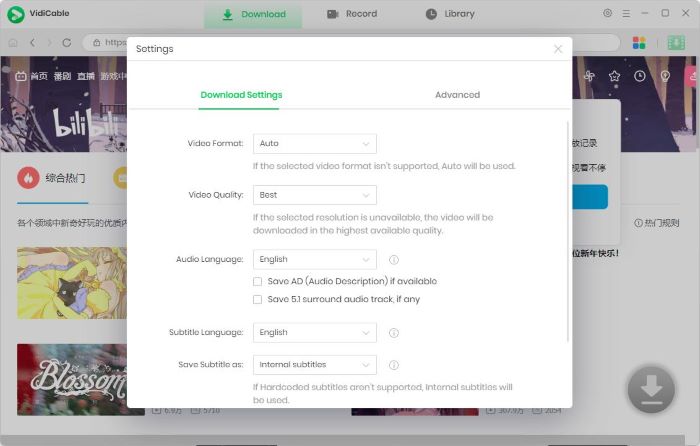
설정 아이콘을 클릭하여 다운로드 옵션을 설정합니다. 원하는 동영상 형식(MP4 또는 MKV)을 선택하고 출력 폴더를 지정한 뒤 영상 화질을 설정할 수 있습니다. 여기서 "최상의" 또는 "1080p"를 선택할 수 있습니다.
Step 3 Bilibili 영상 검색
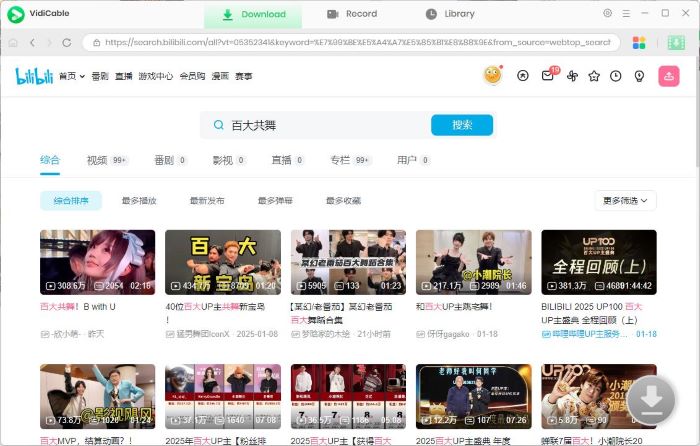
검색창을 사용하여 다운로드하려는 Bilibili 영상을 찾거나 앱 내 홈 화면을 탐색할 수 있습니다. 영상을 재생하면 오른쪽 하단의 다운로드 아이콘이 활성화됩니다(초록색).
Step 4 고급 다운로드 설정
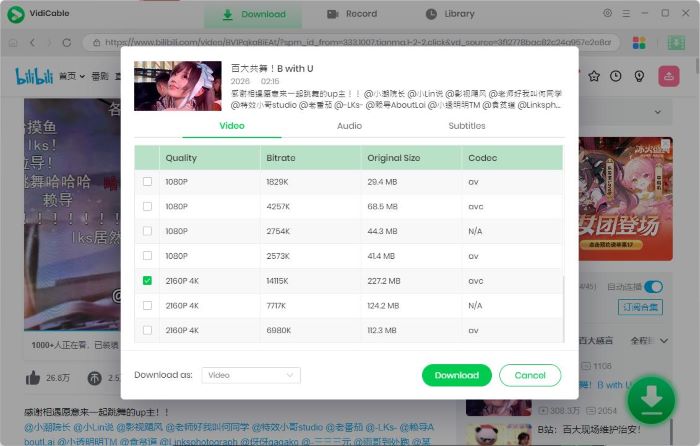
다운로드 아이콘을 클릭하여 옵션 창을 엽니다. 여기에서 영상 화질을 선택하고 오디오 및 자막 트랙을 선택할 수 있습니다.
Step 5 Bilibili 영상 다운로드 시작
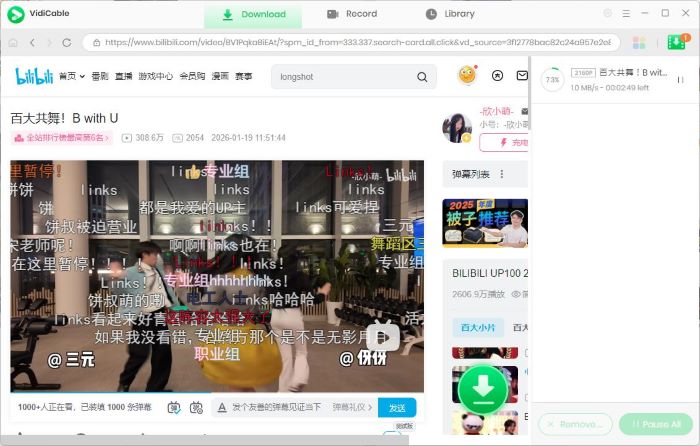
다운로드 버튼을 클릭하면 FlixiCam StreamOne이 자동으로 다운로드를 진행합니다. 다운로드가 완료되면 모든 영상은 도서관 탭에 표시되며 언제든지 오프라인으로 시청할 수 있습니다.
Part 2. 온라인 Bilibili 동영상 다운로더
2.1 SnapAny
- 링크: https://snapany.com/bilibili
- 사용자 평점: ⭐⭐⭐⭐(사용자 리뷰 및 커뮤니티 피드백 기준 4.2/5)
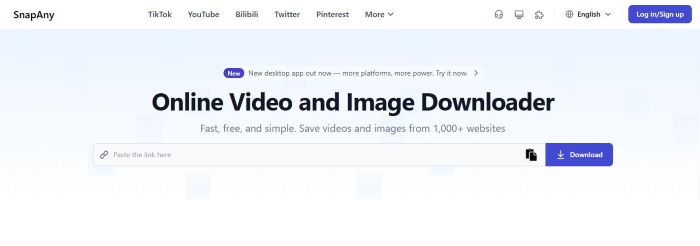
SnapAny는 거의 모든 웹 브라우저에서 영상을 다운로드할 수 있도록 지원하며, 다양한 플랫폼에서 사용할 수 있는 편리한 Bilibili 다운로더입니다. 기기에서 웹사이트만 열면 PC, Mac, Android 스마트폰, iPhone에서 추가 소프트웨어 설치 없이 영상을 저장하여 오프라인으로 시청할 수 있습니다.
또한 SnapAny는 글로벌 사용자를 위해 설계되어 다국어 인터페이스를 제공합니다. 영어, 중국어, 스페인어, 포르투갈어, 러시아어, 일본어, 프랑스어, 한국어, 독일어, 이탈리아어 등을 지원하여 다양한 국가의 사용자들이 쉽게 사용할 수 있습니다.
하지만 SnapAny는 8K 영상 다운로드를 지원한다고 주장하지만, 사용자가 출력 영상 화질을 직접 선택할 수는 없습니다. 이러한 제한 때문에 고화질 Bilibili 영상을 다운로드하고 해상도를 직접 제어하고 싶은 사용자에게는 다소 아쉬울 수 있습니다.
장점
- Bilibili 영상과 미리보기 썸네일 다운로드를 지원합니다.
- 전 세계 사용자를 위한 다국어 인터페이스를 제공합니다.
- 모바일 기기와 컴퓨터 모두에서 사용할 수 있습니다.
단점
- 영상 화질 또는 해상도를 선택할 수 없습니다.
- 다운로드가 자동으로 완료되지 않으며 수동으로 마무리해야 합니다.
SnapAny로 Bilibili 영상을 다운로드하는 방법
Step 1 다운로드하려는 Bilibili 영상 링크를 복사합니다.
Step 2 SnapAny에 링크를 붙여넣고 다운로드를 클릭합니다.
Step 3 동영상 다운로드와 썸네일 다운로드 두 가지 옵션이 표시됩니다.
Step 4 동영상 다운로드를 선택하면 새 페이지가 열립니다. 페이지 오른쪽 하단의 점 세 개 아이콘을 클릭한 후 다운로드를 선택합니다.
Step 5 Bilibili 영상이 MP4 파일로 다운로드되며 오프라인에서 시청할 수 있습니다.
2.2 Download Bunny
- 링크: https://dlbunny.com/en/bilibili
- 사용자 평점: ⭐⭐⭐⭐(웹 사용자 피드백 기준 4.0/5)
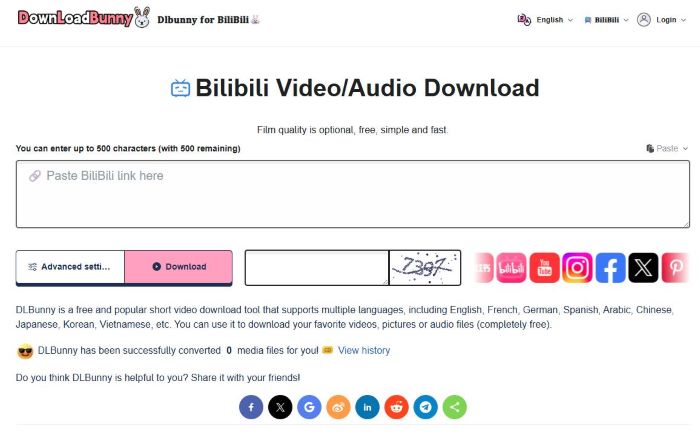
Download Bunny is a solid option if you’re looking for a quick way to save Bilibili content. This online Bilibili video downloader allows users to download Bilibili videos in MP4 format or extract audio as MP3, with multiple video quality options available.
However, Download Bunny also comes with some drawbacks. Videos downloaded through this tool may lack audio, requiring users to manually merge the sound afterward. In addition, a captcha must be entered before every download, which makes it inconvenient for users who want to batch download multiple Bilibili videos. These limitations can significantly affect the overall user experience, especially for heavy or frequent downloaders.
Pros
- Supports downloading files in multiple formats, including MP4 video, MP3 audio, and images.
- Allows users to choose from multiple video resolutions and file sizes.
- Supports online video preview before downloading.
Cons
- Does not support batch downloads.
- Requires entering a verification code before each download.
- Downloaded videos may have no audio and require manual audio merging.
How to Download Bilibili Videos with Download Bunny?
Step 1 Copy the Bilibili video link and paste it into Download Bunny.
Step 2 In the lower-left corner, open Advanced Settings and choose MP4, MP3, or JPEG.
Step 3 Enter the required verification code, then click the pink Download button. You will see different resolution options.
Step 4 Select the resolution you want and wait for the video download to complete.
2.3 Locoloader
- Link: https://www.locoloader.com/
- User Rating: ⭐⭐⭐(3.0/5 based on community and extension reviews)
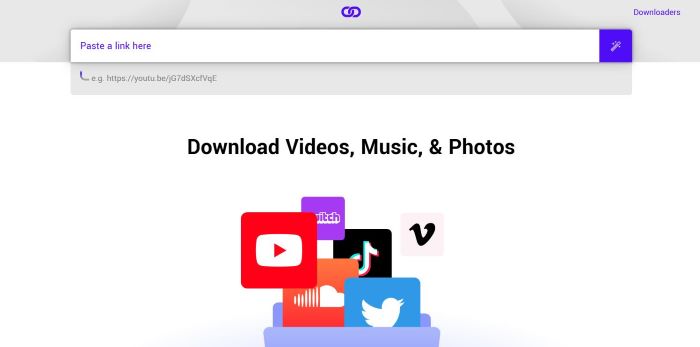
Locoloader is a popular online video downloader that supports a wide range of platforms, including Bilibili, Instagram, TikTok, and Reddit. Like many other Bilibili video downloaders, it features a user-friendly process: simply copy and paste the Bilibili link into the tool to save your favorite videos to your local library. However, Locoloader has limitations regarding output quality. It currently only supports 360p and 480p resolutions, which may not be ideal for users looking for HD downloads.
Pros
- Supports downloading videos not only from Bilibili, but also from other sites such as Instagram, Reddit, and more.
- Allows users to convert Bilibili videos into MP3 audio files for offline listening.
Cons
- Offers limited video quality options, with only 360p and 480p resolutions available.
How to Download Bilibili Videos with Locoloader?
Step 1 Paste the Bilibili video link into Locoloader. Locoloader will automatically analyze the link and provide several download options.
Step 2 The available options include audio, video, and silent video. Make sure to select the with audio option.
Step 3 To download the file, right-click the Download button and select “Save Link As…”.
Step 4 Then you can watch Bilibili videos offline on your device.
Part 3. Bilibili Video Downloader Chrome Extensions
3.1 Video DownloaderHelper
- Link: https://chromewebstore.google.com/detail/video-downloadhelper/lmjnegcaeklhafolokijcfjliaokphfk?hl=en
- User Rating: ⭐⭐⭐⭐(4.4/5 based on 29.2k comments)
With over 29,200 reviews, you’ve likely already installed Video DownloadHelper—one of the most popular Chrome extensions on the market. If you haven't tried it yet, it is a powerful alternative for downloading Bilibili videos.
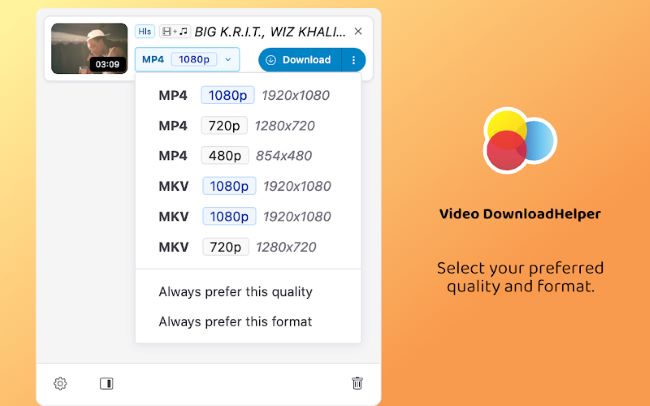
This tool offers advanced features that go beyond basic downloaders; you can customize your output file path and choose from multiple formats like MKV and MP4. Most importantly, it allows you to set your preferred default resolution, ensuring you always capture content in 1080p Full HD or 720p whenever available.
Pros
- Allows users to customize the output path for downloaded videos.
- Supports downloading videos in multiple formats, including MKV and MP4.
- You can set the default download quality to the highest available, either 1080p or 720p.
Cons
- Does not allow manual selection of video resolution.
- It may be failed to detect and parse video.
How to Download Bilibili Videos with Video DownloaderHelper?
Step 1 Install Video DownloaderHelper from the Chrome Web Store on your computer.
Step 2 Open the Bilibili video you want to download in your browser and start playing it.
Step 3 Click the Extensions icon in the top-right corner of the browser and select Video DownloaderHelper.
Step 4 You will see available download options such as MKV and MP4. We recommend choosing MP4 for better compatibility.
Step 5 Click the corresponding download button and wait for the download to complete.
3.2 FetchV
- Link: https://chromewebstore.google.com/detail/fetchv-video-downloader-f/nfmmmhanepmpifddlkkmihkalkoekpfd
- User Rating: ⭐⭐⭐⭐⭐(4.9/5 based on 6k comments)
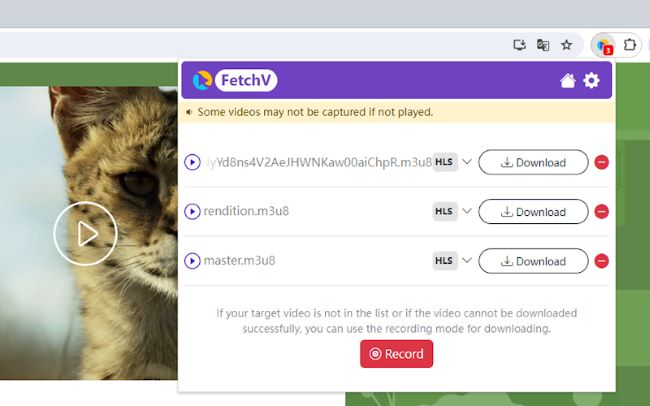
FetchV is another Chrome extension that supports downloading videos from Bilibili. Once installed in your web browser, it lets you download Bilibili videos easily without setting up any additional software, making it a great choice for users who prefer a lightweight and simple solution. If direct downloads fail for any reason, FetchV also offers a recording mode, allowing you to capture and save your favorite Bilibili videos as MP4 files for offline viewing.
Pros
- Allows users to decide whether to automatically save files locally.
- Supports downloading videos via recording, making it possible to capture content from sites that are otherwise restricted.
Cons
- Does not allow manual selection of video resolution.
- Some videos may fail to download, depending on the source or format.
How to Download Bilibili Videos with FetchV?
Step 1 Use the link provided above to visit the Chrome Web Store and install FetchV on your browser.
Step 2 Open the official Bilibili website, browse the content, and start playing the video you want to download.
Step 3 Once the Bilibili video is playing, click the Extensions icon in the top-right corner of your browser and select FetchV.
Step 4 Follow the on-screen instructions to download the Bilibili video. If the download fails for any reason, you can switch to FetchV’s recording mode to save the video instead.
Part 4. Bilibili Video Downloader APK for Android
- Link: https://play.google.com/store/apps/details?id=cc.kafuu.bilidownload
- User Rating: ⭐⭐⭐⭐(500+ downloads)
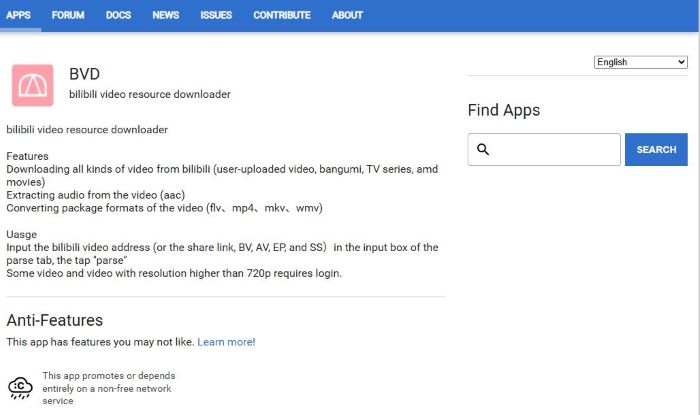
Looking for a way to save Bilibili content on your Android device? The BVD (Bilibili Video Downloader) APK is an excellent solution. This powerful mobile tool goes beyond simple downloads by allowing you to extract audio from videos (AAC) and convert video formats into files like MP4, MKV, FLV, and WMV. By simply copying the alphanumeric ID from any Bilibili video link, the app quickly parses the data, making it easy to download your favorite content directly to your Android phone.
Pros
- Supports downloading subtitles and on-screen comments (danmaku) along with videos.
- Allows saving video cover images for easy reference.
Cons
- Available only on Android devices, limiting usage on other platforms.
How to Download Bilibili Videos with Bilibili Video Downloader APK?
Step 1 Get the BVD Bilibili video downloade apk on your Android device. Open the app and go to the Parse tab.
Step 2 You can enter a BV, AV, EP, or SS ID into the input box.
Step 3 Tap the Parse button, and the app will analyze the video and load the available download resources.
Step 4 Choose the video quality and format you want to download. Tap the Download button to start downloading. Wait for the download to complete.
Step 5 Once finished, you can watch the downloaded Bilibili videos offline
Part 5. Comparison Table of Bilibili Video Downloaders
| Bilibili Video Downloader | Max Quality | No Watermark | Ad-Free | Easy to Use |
|---|---|---|---|---|
| FlixiCam StreamOne | 4K | ✅ | ✅ | ⭐⭐⭐⭐⭐ |
| SnapAny | 720p | ✅ | ❌ | ⭐⭐⭐⭐⭐ |
| Download Bunny | 720p | ✅ | ❌ | ⭐⭐⭐⭐☆ |
| Locoloader | 480p | ✅ | ❌ | ⭐⭐⭐⭐☆ |
| Video DownloaderHelper | 720p | ✅ | ✅ | ⭐⭐⭐⭐⭐ |
| FetchV | 720p | ✅ | ✅ | ⭐⭐⭐⭐⭐ |
| BVD (APK) | 1080p | ✅ | ✅ | ⭐⭐⭐⭐☆ |
Part 6. FAQs about Bilibili Video Downloader
How to download Bilibili video without watermark?
All the Bilibili video downloaders in this guide support downloading videos without watermarks. You can choose the downloader that best fits your device. For PC or Mac users, we recommend FlixiCam StreamOne, while Android users will find BVD to be a great option.
Can you download Bilibili in 4K?
Yes, you can download high-quality Bilibili videos, but not all Bilibili video downloaders can do that. Most online downloaders only support lower resolutions, such as 360p or 720p. If you want to download Bilibili videos in 4K, the best choice is FlixiCam StreamOne. This professional Bilibili downloader allows you to save videos in 4K MP4 or MKV formats, giving you the highest quality offline playback.
How to download Bilibili video with audio?
Although most Bilibili video downloaders support videos with audio, a few tools—such as Download Bunny—do not. To avoid downloading low-quality videos without sound, we recommend using FlixiCam StreamOne, a professional Bilibili downloader. It not only allows you to download videos with audio, but also lets you save the audio separately as MP3 files.
Final Words:
This guide reviewed 7 working Bilibili video downloaders, covering the needs of users across different devices like Android, PC, or Mac. For each tool, we also provided step-by-step instructions to help you download Bilibili videos easily and efficiently.
Keep in mind that some free Bilibili video downloaders may include ads or have feature limitations, so it’s important to use them with caution. If you’re looking to download Bilibili videos in 4K with better stability and higher output quality, FlixiCam StreamOne is a reliable option worth trying.
Tessa Kirkland | Senior Writer